
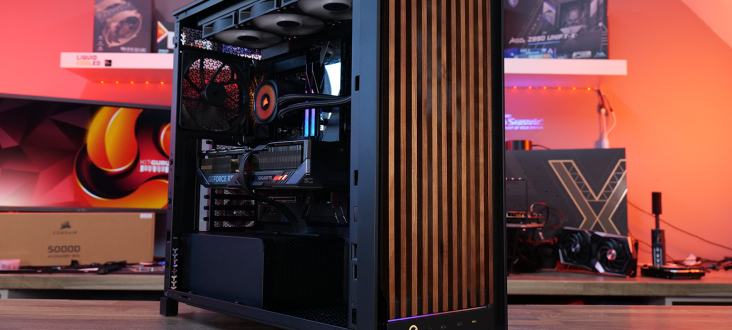
Corsair's Frame 5000D Wood RS is a real upgrade rather than a cosmetic trick: the solid wood front, pair of 200mm intake fans, USB-C-heavy front panel, and cleaner interior make one of Corsair's big modular cases feel more premium and easier to live with.
It is still the same basic full-tower idea: huge case, glass everywhere, modular panels, room for big graphics cards, and enough motherboard and radiator support to make it a long-term build platform. But the Wood RS version changes the most visible parts of that formula in ways that actually matter.
The headline change is the front. Instead of the regular Frame 5000D's more standard mesh-and-glass look, Corsair has fitted an FSC-certified solid wood panel. Depending on the colorway, that means black with walnut or white with oak. The result is warmer and more expensive-looking, but not sealed off like some decorative front panels can be.
The Wood RS Keeps the Big-Case Flexibility
At 542 x 250 x 556mm, this is not a case for hiding in a corner cabinet. It is a full tower built around space: ATX, micro-ATX, and Mini-ITX boards, reverse-mount support, eight horizontal expansion slots, and room for a 425mm graphics card with fans attached.
That last number matters because modern GPUs have gotten thick, tall, and occasionally allergic to basic geometry. A case that can swallow a big card without turning installation into a tiny card-sorting exercise still has real value, even if this one is not perfect.
Corsair also keeps the Frame ecosystem's practical side. The case supports ATX power supplies, multiple radiator sizes, and a wide range of fan options across the front, top, side, rear, and bottom. That is the kind of boring flexibility that makes a case easier to recommend because it can grow with the build instead of becoming a dead end.
For a build with a Ryzen 9800X3D, an RTX 5080, a 360mm AIO, and a high-end motherboard, the Frame 5000D Wood RS gives you enough room to breathe. That is exactly what you want from a large case: less cable drama, less heat stacking, and fewer awkward compromises.
The Front I/O Finally Feels Current
The other meaningful hardware change is the front I/O. Corsair moved to a layout with three USB Type-C ports: two USB 3.2 Gen 1 Type-C ports at 5Gb/s and one USB 3.2 Gen2x2 Type-C port at 20Gb/s.
That is a much better setup than the old single-port, single-speed arrangement. Modern workstations, external drives, VR kits, and high-speed USB devices all benefit from having multiple Type-C connections available without digging into the back of the PC.
This matters because front I/O is where you actually touch the case every day. A gorgeous wood panel looks good, but a front panel that makes connecting modern gear annoying still feels one generation behind.
The rest of the layout is familiar Corsair: power button, combo mic/headphone jack, and enough space to use without needing a small screwdriver. No LCD screen, thankfully, which keeps the design from chasing gimmicks that usually age badly.
The 200mm Fans Are the Real Story
The original Frame 5000D had big cooling potential, but the Wood RS version gives that potential a cleaner starting point. Corsair swaps the standard 140mm front intake fans for two massive 200mm RS200 fans.
That is not just a spec-sheet flex. Large fans can move a lot of air at lower RPM, which usually means good airflow with less whine. In this case, the stock setup is the one Corsair wants you to use, and the testing backs that up.
The review used a high-end test system with an AMD Ryzen 7 9800X3D, MSI MEG X870 Godlike motherboard, Gigabyte RTX 5080 Gaming OC, Corsair RM1200x Shift power supply, Corsair Nautilus 360 RS ARGB AIO, and the stock RS200 front fans.
For thermal testing, Corsair looped Cinebench R23 and 3DMark Speed Way for 30 minutes. That is a good way to push both CPU and GPU into steady-state load instead of measuring only a short burst of heat. Temperatures were then compared with the default fan setup, side panel removed, front panel removed, and extra intake fans added.
Cooling Performance Is Already Well Optimized
In the default configuration, with the 360mm AIO exhausting from the top, two 200mm front intake fans, one 140mm rear exhaust fan, and all panels installed, the case performed very well.
The CPU averaged 55°C above ambient temperature, while the GPU averaged 52°C above ambient. Those are strong numbers for a full tower running stock case airflow, especially with a high-end GPU and CPU in the same chamber.
Adding extra side or floor intake fans barely moved the needle. The GPU dropped by only one or two degrees Celsius, which is nice but not transformative. Removing the tempered glass side panel changed almost nothing, shaving about 1°C off the CPU and leaving the GPU unchanged.
That is the important part. Corsair did not just put a bigger fan in the front and call it a day. The airflow path seems tuned well enough that the default setup already does the heavy lifting.
In practical terms, that means most buyers can install the case as shipped and get excellent cooling without spending an afternoon rearranging fans. That is a win for people building a clean setup, not just for benchmark nerds with a spreadsheet open.
Noise Stays Controlled at Sensible Speeds
The noise results line up with the thermal results. With the case fans held at a low RPM, the default setup was very quiet, with the main noise coming from the AIO pump and GPU fans.
Removing the side panel produced the lowest temperatures, but the load noise drop was only about 1dBA. That is real on paper, but it is not the kind of change you will notice while gaming or working unless you are sitting directly next to the case.
Corsair's 200mm fans are doing what you want from them: pushing enough air without making the case sound like a vacuum cleaner. That is especially useful for a large white or black build where the goal is usually quiet performance, not a noisy tower with blinking lights.
There is still a practical limit. If you run the fans aggressively, noise will rise. But with sensible fan curves, the Frame 5000D Wood RS is not asking you to choose between cool components and a quiet room.
The Build Experience Is Not Perfect
The case is excellent when it is running, but the actual build process has some rough edges. Installing the motherboard proved awkward, especially when the backplate made alignment harder than it needed to be.
Graphics card installation was also fiddlier than expected. The opening around the PCIe slots does not leave much room to maneuver, particularly if your motherboard has chunky rear heatsinks around the M.2 area.
Neither issue breaks the case. But for a premium full tower, you expect the installation experience to feel as polished as the cooling results. A £159.95 chassis should not make you wrestle with a backplate and a graphics card like you are threading a cable through a maze.
This is also where the case's size cuts both ways. The Frame 5000D Wood RS is roomy, flexible, and built for serious hardware. It is also large, which may be overkill for a basic gaming PC that only needs an RTX 4070-class card and a midrange cooler.
Who This Case Is Actually For
The Frame 5000D Wood RS makes the most sense for builders who want a large, quiet, high-airflow case with a more refined look. It is especially appealing if you are building a black-and-walnut or white-and-oak setup and want something that feels less like the default mesh box on every desk.
It also fits Corsair users who already like the Frame ecosystem. The modular panel system, broad cooling support, and reverse-mount motherboard layout keep the case useful as hardware gets bigger and stranger.
If you need something smaller, the Frame 4000D Wood is the more compact alternative. But if you want room for a big GPU, a 360mm AIO, lots of cables, and a premium-looking front panel, the 5000D Wood RS has a stronger argument.
For most people, the case's main appeal is not one single feature. It is the combination: real wood, strong airflow, quiet stock fans, modern front USB-C, and enough internal space to avoid future regrets.
The Final Verdict
The Corsair Frame 5000D Wood RS earns its place as a worthy refresh rather than a lazy appearance package. The wood front panel gives it a more mature look, the 200mm fans improve the default cooling setup, and the updated front I/O makes the case feel more current.
Its weaknesses are mostly installation-related: motherboard alignment can be annoying, GPU installation can feel tight, and the chassis is big enough that it will not suit every desk or every build. But those frustrations do not outweigh the strong airflow, quiet operation, and premium design.
If you are building a high-end PC and want a case that looks good, stays quiet, and gives you room to work with, the Frame 5000D Wood RS should be on the shortlist. Corsair did not just put wood on a familiar tower and hope nobody noticed. It made a real refresh, and that is exactly what this case needed.





Comments (0)
Loading comments…