
How to Gift Drop Cars in Forza Horizon 6
Gift drop lets you take a car from your garage and leave it for another eligible Forza Horizon 6 player to claim at random. You cannot choose the recipient, and the game only allows certain cars, so treat it as a permanent garage trade rather than a precise favor.
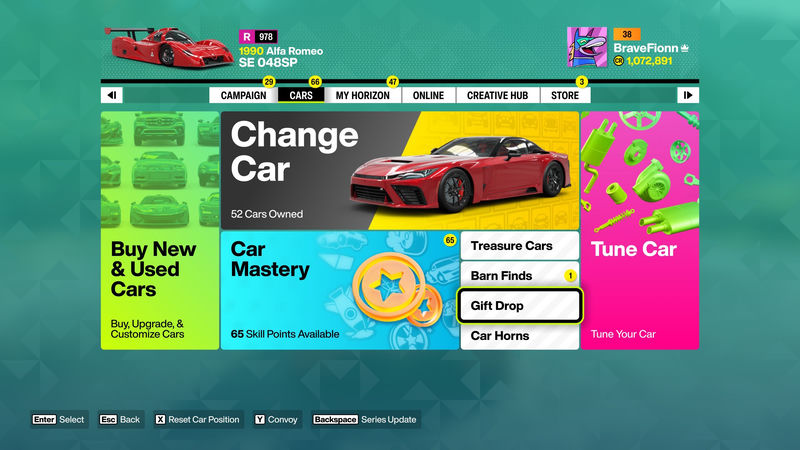
The feature unlocks early, after your first barn find, and it is easy to miss because Forza Horizon 6 does not give it a big tutorial moment. Once it is available, you can activate it from the main menu under the Cars section, or you can use the on-screen prompt when you drive near an empty barn.
If you were hoping to send a specific car to a friend, this is not that system. Gift drop is the game's public generosity tool: you set loose filters, leave the car, and let the match make the choice.
How Gift Drop Unlocks
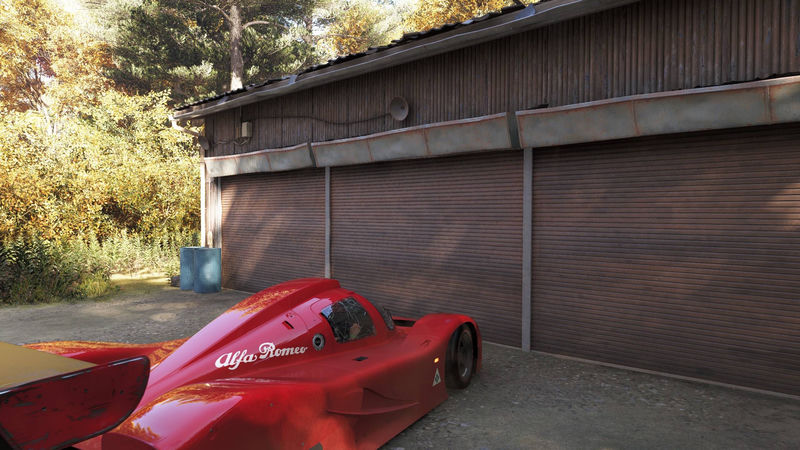
Gift drop becomes available after you earn your first barn find. After that, driving near an empty barn can trigger a large Gift Drop prompt, with Mei and Jordan framing the empty space as a chance to help someone else fill it.
“Gift Drop”
The prompt is useful, but it is not required. You can still gift a car from the main menu, and you do not need to stand in front of a barn to use the feature.
That distinction matters because barns are not the whole system. A gift car does not replace a barn's normal car for other players who have not found it yet, so gift drop should be read as a separate goodwill feature rather than a shortcut around barn progression.
Where to Find the Gift Drop Option
Open the main menu, go to the Cars section, and look for Gift Drop at the bottom right of the screen. The placement is simple once you know where to look, but the game's quieter presentation means new players may stumble across the option without understanding what they are about to lose.
If Jordan pops up and starts talking about gifts and barns, treat it as a breadcrumb. Stop by a barn when you can, because there may be a gift waiting for you there.
That is the main thing to remember before pressing enter: the selected car leaves your inventory permanently. If the vehicle is rare, expensive, or personally tied to a collection, test the menu flow first and do not start with your best drop.
How to Gift Drop a Car
- Select the car you want to drop from your garage.
- Choose who can receive it: Anyone, New players, New Horizon Legends, Returning players, or Community contributors.
- Pick a pre-scripted message for the recipient.
- Choose whether to include your Gamertag or in-game username, or stay anonymous.
- Confirm the drop and wait for the random match to claim it.
The recipient list is broad, but it is not a targeting tool. The game picks a random eligible player based on your filters, then sends that player a notification to pick up the gift.
As the sender, you also get a notification once someone claims the car. That confirmation loop is the only direct feedback you get after the drop is live.
Which Cars Can Be Gifted
Most gift drops start with a garage selection, but not every car is eligible. Cars obtained through the game's deluxe edition or welcome packs cannot be gifted, so locked promotional vehicles stay locked to the owner who received them.
This restriction keeps gift drop useful for the normal car economy without turning bonus or paid content into a public bounty. It also means the feature is best for cars you are comfortable giving away, not for moving special acquisition cars around.
Who Can Receive a Gift Drop
Before you drop a car, you can choose the type of player it is allowed to reach. The available filters are Anyone, New players, New Horizon Legends, Returning players, and Community contributors.
That range gives gift drop a gentle community-shaping role. A player can use it to help newcomers, welcome people back after a break, support active community members, or simply leave a car out for whoever happens to be nearby.
It still does not let you send a car to a named person. If you want to help a specific friend, you need another method outside gift drop; this feature is designed for public, random sharing.
What Happens After You Drop a Car
Once you confirm the drop, the car is removed from your garage and placed in the gift system for an eligible player to claim. The recipient receives a notification, then you receive a notification when they take it.
The permanence is the part that changes the decision from casual to careful. A dropped car is not sitting in your inventory anymore, even if nobody claims it immediately.
How Gift Drop Fits Into Forza Horizon 6
Forza Horizon games have always leaned into open-road generosity, with players leaving cars for strangers and treating those drops as small social gestures. Gift drop makes that tradition more structured by adding filters, messages, and notifications, but it keeps the same basic appeal: a random player can turn an empty spot into someone else's good surprise.
For new players, that can be a meaningful boost. For returning players, it can soften the awkwardness of coming back into a large car economy. For veteran players, it is a low-friction way to clear space or reward the community without selling cars or entering trades.
The best use case is simple: drop cars you are happy to lose, choose a recipient filter that matches your intent, and let the game handle the rest. It is not a way to control who gets what, but it is a useful way to make Forza Horizon 6's open world feel a little less empty.
Quick takeaway: gift drop is an early-unlocking, permanent car giveaway system in Forza Horizon 6. Find it under Cars in the main menu, pick an eligible car, choose a recipient type, then let the game match a random player.



Comments (0)
Loading comments…